Cold storage
Cold storage moves eligible historical partitions off local disk and into an object store as Apache Parquet. The partitions stay in the same table and answer the same SQL: a single query can span native, local Parquet, and remote Parquet partitions without the application knowing which is which. Recent data continues to live on local disk at local-disk latency, so the practical effect is a much smaller local footprint for tables with long retention.
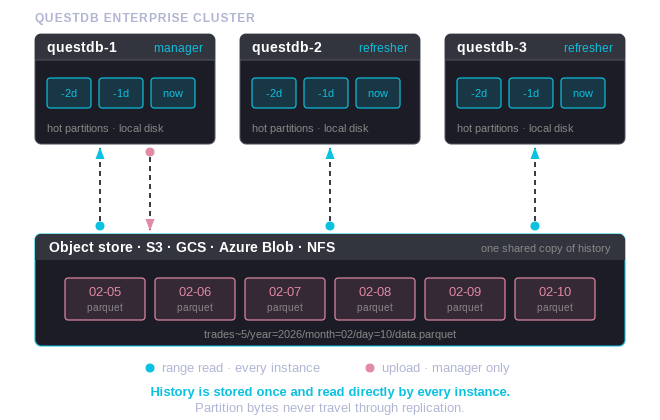
History is written once, by one instance, and read by all of them. A replica does not receive a copy of a cold partition: it reads the same object the manager uploaded. Adding instances therefore adds query capacity over the history without adding storage.
Cold storage is driven by a storage policy.
Cold storage is available in QuestDB Enterprise only, and is disabled by default.
Requirements
Cold storage runs on top of a storage policy, so a table must first meet that page's requirements. The remote stages then add:
cold.storage.enabled=trueon every instance- A WAL-enabled table, since remote stages are rejected on non-WAL tables
- A policy carrying a
TO REMOTEstage - A cold storage root that every instance can read. Only the cold storage manager writes its data, catalog and manifests; instances that take backups, and databases recovered from it, also write pins under
_retention/. The root is the object store location set bycold.storage.object.store, such as a bucket and prefix, and it belongs to one database. See Prepare the object store root for the access each instance needs
The active partition is never eligible.
For the configuration keys and the setup procedure, see Cold storage configuration and Operating cold storage.
Partition lifecycle
Cold storage is a lifecycle for whole time partitions, not a whole-table migration and not a local cache of remote data. The unit of movement is always a complete partition.
The storage policy stages decide when each transition fires. What they mean for the data is:
| Phase | Where the data is | Behaviour |
|---|---|---|
| Hot local | Native columns or local Parquet | Writable, local-disk latency |
| Remote durable | Local disk, plus a Parquet copy in the object store | Still served locally, still accepts late data |
| Cold | Object store, with metadata and symbol indexes local | Served by range reads. Read-only, unless late rows are enabled |
| Expired | Removed from the table | Objects reclaimed after the grace period |
Retaining data after local eviction requires both TO REMOTE and DROP LOCAL. Which stage fires when, and how the four relate, is covered under storage policy.
With late rows enabled, a cold partition keeps accepting late rows. They stay on the local disk of each instance until maintenance folds them into a new Parquet object in the object store.
Reads
A cold query does not download the partition. When a partition is switched to remote service, QuestDB keeps its Parquet metadata and symbol indexes on local disk and removes only the large data.parquet file. That local metadata maps row groups and column chunks to byte ranges inside the remote object.
- The planner prunes partitions and resolves the projected columns as usual.
- The Parquet decoder uses the local metadata to select the row groups and column chunks the query needs.
- QuestDB issues range reads for exactly those byte ranges.
- The returned buffers are decoded in memory and SQL execution continues normally.
Adjacent ranges are coalesced into fewer requests, and concurrent reads of the same chunk from the same object share a single in-flight download rather than fetching the same bytes twice. Downloaded chunks are held only while an active read holds a lease on them, and are evicted when the last lease is released. There is no idle warm cache.
Compressed bytes pinned by a query count against that query's memory budget, so a runaway cold scan trips the normal query memory limit rather than exhausting a shared pool. When the coordinator's pending-batch limit is exhausted the query fails fast with a backpressure error instead of queueing without bound.
A query that reaches cold data waits on the object store round trip, so expect higher latency than the same query over local partitions. Narrow timestamp ranges, partition pruning, and projecting only the columns you need all have a direct effect on latency, request count, and memory.
A partition with late rows is read as its Parquet object plus the late rows on local disk, merged in timestamp order.
After a restart, a cold read waits up to 10 seconds for the instance to load the table's manifest, then fails with manifest resolution timed out. Retry the query once the instance has loaded it.
What happens to late rows
DROP LOCAL is the boundary after which a partition stops being an ordinary writable partition. QuestDB marks it with an event in the table's WAL, so every write is ordered either before that event or after it, and every instance in the cluster agrees on where the line falls.
Before DROP LOCAL, an out-of-order write can still land in an uploaded partition. QuestDB invalidates the uploaded copy and schedules a replacement upload, so the remote snapshot never drifts from the table.
After DROP LOCAL, what happens to a late row depends on the table:
| Table | At DROP LOCAL | Late rows for the partition |
|---|---|---|
| Without deduplication, with late rows enabled | Switched to a Delta partition | Kept, and returned by queries |
| Without deduplication, with late rows disabled | Sealed as read-only | Dropped at apply time, and logged with o3 ignoring write on read-only partition. The rest of the transaction applies |
| With deduplication | Sealed as read-only | The transaction fails with cannot insert into read-only partition and the table is suspended. See deduplication for how to skip the transaction |
For a sealed partition:
- A WAL
UPDATEthat touches a sealed partition is skipped as a whole transaction, including the writable partitions that the same statement matched. - Disabling or removing the storage policy does not unseal a partition.
CONVERT PARTITION TO NATIVEis refused.- Lengthening
DROP LOCAL, or settingstorage.policy.drop.local.override, brings a sealed cold partition back to local disk. QuestDB downloads it again, and it stays read-only. A Delta partition stays served from the object store instead. Enabling late rows switches sealed partitions, cold ones included, to Delta partitions, with the exceptions listed under Partitions sealed before late rows were enabled.
Without late rows, treat DROP LOCAL as a hard cutoff. Set it beyond the longest late-arrival, replay, and correction window for the table. Writes that arrive for a sealed partition are dropped at apply time, or suspend a deduplicated table, rather than being rejected at insert time, so test this boundary against your real ingestion pattern.
Object store layout
Each version of a partition that QuestDB uploads is a base: a standard Parquet file, data.parquet, with its QuestDB metadata, _pm. Every base is written once, under a key of its own, and never overwritten:
<root>/
  _manager.lock
  _tables.msgpack
  _retention/
  trades~5/
    _manifest.msgpack
    1770681600000000-1234-7/
      data.parquet
      _pm
A base's key is <table directory>/<partition timestamp>-<seqTxn>-<metadata version>/, where the partition timestamp is a number in the table's timestamp unit, seqTxn is the table transaction the base reflects, and the metadata version is the table's schema version. A partition can have several bases over time: a new upload, or a compaction of late rows, writes a new base, and garbage collection deletes the replaced one after the grace period.
Bases uploaded by releases before QuestDB Enterprise ENTERPRISE_VERSION_TBD stay at their earlier paths, such as trades~5/year=2026/month=02/day=10/data.parquet, and are still read.
data.parquet is standard Parquet, so external tools can read it. They must not assume one object per partition, and must take the current object of each partition from table_cold_partitions(). Late rows are not in any object until they are compacted into a new base. To catalog the objects in a data lake, see Register QuestDB Parquet as Apache Iceberg tables. Every underscore-prefixed object, whatever file extension it carries, is QuestDB control data and must not be edited: _tables.msgpack is the catalog of the root's tables, _manifest.msgpack lists a table's bases, and _retention/ holds the pins that keep bases a backup needs.
QuestDB must be the only writer to the root. External tools may read data.parquet, but replacing, rewriting, or deleting a live object is a data-loss event, as are provider lifecycle rules that archive or expire objects. Do not point two databases at the same root.
Each table has a manifest recording the bases of every partition. The states surface in table_cold_partitions(), one row per partition:
| State | Meaning |
|---|---|
pending | Upload work is registered but the object is not yet durable |
active | The base is durable, and is the one the partition serves or will serve |
deleting | The table no longer references the base; the grace timer is running |
unknown | The manifest holds a state this instance does not recognise |
Roles
Cold storage splits work between two roles, both of which are independent of the replication primary and replica roles:
| Role | Responsibility |
|---|---|
| Manager | Uploads snapshots, writes new bases for late rows, writes the catalog and manifests, runs remote garbage collection. Exactly one per database. |
| Refresher | The default. Mirrors the catalog and manifests, and installs or removes local cold-partition metadata. |
All four combinations of cold-storage role and replication role are valid. Running the manager on a replica moves upload, manifest, and garbage-collection work off the primary.
Partition bytes never travel through the replication stream. The DROP LOCAL event replicates like any other WAL event, and each instance then reads the shared data.parquet object and installs its own local metadata. With late rows enabled, each instance applies the late rows itself and keeps them locally, then switches to the new bases the manager writes.
The manager role can be moved between instances at runtime with SWITCH COLD STORAGE ROLE. See Operating cold storage for the handoff procedure.
One root per database
The catalog of a root records the DataID of the database that writes it. An instance of another database refuses the root with ER010: it starts, but its cold storage promotion and cold reads fail, and it writes nothing to the root. Replicas of a database, and a plain restore of its backup, share its DataID and use the same root. A point-in-time recovery starts a new database, which needs a root of its own.
A replica whose tables are behind what the root has published cannot be promoted to primary: the promotion is refused with ER011.
Integrity
When a partition switches to remote service, QuestDB records which version of the object it installed, and pins every later read to it. If a read returns anything other than that version, it fails rather than handing back data from the wrong one. Object stores enforce this on QuestDB's behalf; on a filesystem store the check is weaker, which is one more reason QuestDB must be the only writer to the root.
This is a version guard, not an end-to-end checksum.
A legitimate change of version, after restoring onto a different host, copying an fs root or migrating between backends, heals itself. The first affected read fails with cold-storage partition stale: snapshot id no longer pins the stored object, re-identify needed, QuestDB re-checks the object in the background, and adopts it if it is still the partition it expects; a retry after that succeeds. A Delta partition heals the same way, but its re-check waits while the partition is busy or this instance has not yet applied the WAL up to its base, so its reads can keep failing for a while. A copy must keep every object under its key: a renamed or missing object keeps failing its reads, and an object that is genuinely different is refused rather than adopted.
Restrictions on cold storage tables
Some operations would rewrite data that only the object store holds, or break the link between a table's transactions and its bases, so they are refused on cold storage tables. A table is tracked by cold storage when it is in the root's catalog, has a manifest, or has a policy with a TO REMOTE stage. A Delta partition is a partition that keeps late rows.
| Operation | Refused when | Error | Instead |
|---|---|---|---|
ATTACH PARTITION | The table is tracked by cold storage | cannot attach partition, table is tracked by cold storage | Insert the rows |
DETACH PARTITION | The table is tracked by cold storage; the partition is read-only or a Delta partition, on any table | cannot detach partition, table is tracked by cold storage, cannot detach partition, partition is read-only, cannot detach partition, partition is delta-active | DROP PARTITION |
REBASE WAL | The table is tracked by cold storage, or has a Delta partition | cannot rebase WAL, table is tracked by cold storage, cannot rebase WAL, table has a delta-active partition or delta data | None |
SET TYPE | The table is tracked by cold storage, or has a Delta partition; on every table while the instance changes cold storage role | cannot change table type, table is tracked by cold storage or its catalog is not synced yet, cannot change table type, table has a delta-active partition or delta data, cannot change table type, cold storage state is not known yet, retry | Copy the rows into a new table |
ALTER COLUMN ... ADD INDEX | A partition is served from cold storage, or is a Delta partition | cannot create index, table has a delta-active or remotely served partition | Create indexes before partitions go cold |
ADD COLUMN ... INDEX | The table has a Delta partition | cannot create index, table has a delta-active partition | None |
UPDATE | The table has a Delta partition | cannot update table with delta partitions [...]; delta partitions are read-only for UPDATE | None. Without late rows, a WAL UPDATE that touches a sealed partition is skipped as a whole transaction |
ALTER COLUMN ... TYPE | The table has a read-only, cold or Delta partition | cannot change column type, table has read-only partitions, ... table has partitions in cold storage, ... table has delta-active partitions | Add a column of the new type |
DEDUP ENABLE | The table has a Delta partition | cannot enable deduplication, table has delta-active partitions | Enable deduplication before late rows are enabled |
CONVERT PARTITION TO NATIVE | The partition is read-only, cold, or a Delta partition | cannot convert parquet partition to native, partition is read-only, ... partition is in cold storage and read-only; ..., ... partition is delta-active | Query the partition in place, or copy its rows into another table |
CONVERT PARTITION TO PARQUET | The partition is a native Delta partition | cannot convert partition to parquet, partition is delta-active | None |
REINDEX | A named partition is a Delta partition. Without a partition name, Delta partitions are skipped | cannot reindex Delta partition | None |
SET STORAGE POLICY with TO REMOTE | A SET TYPE conversion is pending | cannot upload a table with a pending type change, cancel it with SET TYPE to its current type | Cancel the conversion with SET TYPE to the table's current type |
ADD INDEX is checked on the instance that receives the statement. Another instance that serves a partition from cold storage, for example because of storage.policy.drop.local.override, skips the replicated statement and logs index not created on this instance. That instance has no index on the column, also after a failover: its rows are the same, only queries on that column are slower there.
On startup, QuestDB cancels a pending SET TYPE on a table with cold storage or late-row state.
Limitations
- WAL tables only. Remote stages are rejected on non-WAL tables, and the active partition is always excluded.
- No materialized views. A materialized view accepts no storage policy at all, so it cannot be tiered to object storage. It uses TTL for retention instead.
- One root per database. A root refuses other databases with
ER010, and a point-in-time recovery needs a root of its own. - No downgrade. Once a cold storage manager of QuestDB Enterprise ENTERPRISE_VERSION_TBD or later writes to a root, earlier releases cannot use it, whether or not anything was uploaded. See Upgrade.
- Upgrade every instance before the manager. Upgrade the instance that runs the cold storage manager last, and enable late rows only after every instance is upgraded. See Upgrade.
- Operator-driven manager failover. The manager role moves at runtime, but nothing detects manager death or elects a replacement, and a hot-switched role does not survive a restart. On Kubernetes, the Enterprise Kubernetes Operator declares the manager in
spec.coldStorage.managerand re-applies it across restarts; electing a replacement is still a human decision. - Backups do not contain cold data. A backup captures a cold partition's local metadata and symbol indexes, but not its
data.parquetbytes, which exist only in the object store. Instead, aBACKUP DATABASEbackup pins the bases it needs, so garbage collection keeps them while the backup exists. A disk snapshot taken withCHECKPOINT CREATEpins nothing. - Lagging instances. An instance stopped, or behind on replication, for longer than the garbage collection grace periods fails reads of the partitions dropped or replaced meanwhile, until it catches up. Nothing is lost.
- No idle warm cache. Chunks are shared only while an active read holds a lease.
- Fixed key layout. Object key templates are not configurable.
SHOW PARTITIONSgained two columns.seqTxnandisRemotelyServedare appended, so tools binding result columns by position must be updated.
See also
- Late rows in cold storage for keeping rows that arrive after
DROP LOCAL - Storage Policy for the lifecycle stages and their TTLs
- Operating cold storage for setup, failover, monitoring, and troubleshooting
- Cold storage configuration for every
cold.storage.*key SWITCH COLD STORAGE ROLEfor moving the manager roletable_cold_partitions()for per-partition remote state- Backup and restore for what a backup does and does not contain